
代码实践#
您可以通过此链接在 Colab 上找到此 notebook。
简介#
在这个代码示例中,我们将构建一个简单的 music captioning(音乐字幕生成)模型。
正如我们在教程中所看到的,music captioning 是处理音乐音频并生成描述其内容的自然语言的任务。
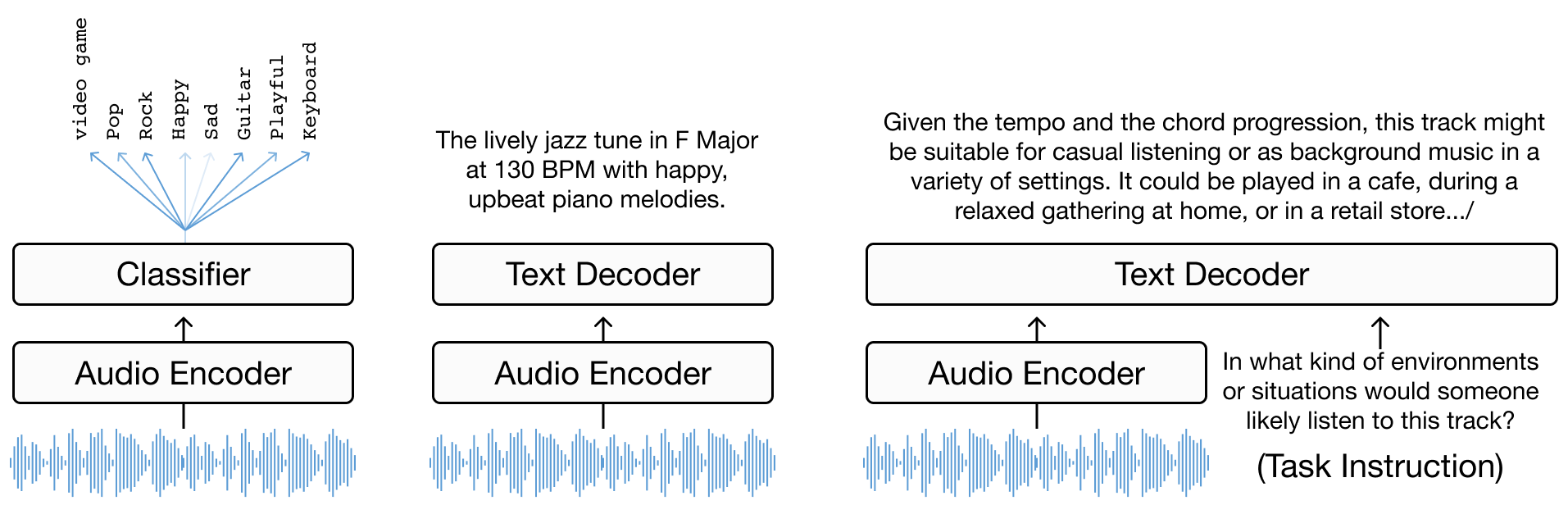
该任务可以被视为以音乐信号为条件的语言建模,我们已经看到有不同的建模范式可以实现这一目标。其中,encoder-decoder 模型是 music captioning(以及其他类型的媒体字幕生成)中常用的框架。顾名思义,这类模型简单地由一个生成输入音频表示的 encoder 和一个将这些表示“翻译”为自然语言的 decoder 组成。
我们将构建什么#
现在我们将所学付诸实践,构建并训练我们自己的 encoder-decoder music captioning 模型。为了使训练在较短的时间内可行,我们使用一个小型数据集并利用预训练的音频编码和文本解码模块。但总体原理和设计与更复杂的模型并无本质区别。具体来说,我们使用:
MusicFM 作为我们的音频 encoder:Minz et al. A Foundation Model for Music Informatics
GPT2 作为我们的文本 decoder:Radford et al. Language Models are Unsupervised Multitask Learners
前提条件#
基本的 Python 知识
熟悉深度学习概念
Google Colab 帐号(免费!)
我们使用 PyTorch 构建模型,并使用 HuggingFace Datasets 快速设置数据,但即使您不太熟悉这些工具,代码也足够简单易懂。
让我们开始吧!#
第一步:搭建环境#
首先,让我们搭建 Google Colab 环境。创建一个新的 notebook,并确保启用了 GPU 运行时。
import torch
print("GPU Available:", torch.cuda.is_available())
print("GPU Device Name:", torch.cuda.get_device_name(0) if torch.cuda.is_available() else "No GPU")
---------------------------------------------------------------------------
ModuleNotFoundError                       Traceback (most recent call last)
Cell In[1], line 1
----> 1 import torch
      2 print("GPU Available:", torch.cuda.is_available())
      3 print("GPU Device Name:", torch.cuda.get_device_name(0) if torch.cuda.is_available() else "No GPU")

ModuleNotFoundError: No module named 'torch'
第二步:加载数据#
我们将使用 LP-MusicCaps-MTT 数据集的一个子集。该数据集非常适合我们的需求,因为它不太大(3k 训练样本,300 测试样本),且包含采用 CC 许可的 10 秒音乐片段。
%%capture
!pip install datasets transformers
import torchaudio
import torch.nn as nn
from tqdm.notebook import tqdm
from transformers import AutoModel, Wav2Vec2FeatureExtractor, GPT2LMHeadModel, GPT2Tokenizer
from datasets import load_dataset
from IPython.display import Audio

dataset = load_dataset("mulab-mir/lp-music-caps-magnatagatune-3k", split="train")
print("Original Magnatagatune Tags: ", dataset[10]['tags'])
print("-"*10)
print("LP-MusicCaps Captions: ")
print("\n".join(dataset[10]['texts']))
Audio(dataset[10]['audio']["array"], rate=22050)
Original Magnatagatune Tags:  ['vocals', 'female', 'guitar', 'girl', 'pop', 'female vocal', 'rock', 'female vocals', 'female singer']
----------
LP-MusicCaps Captions:
Get ready to be blown away by the powerful and energetic female vocals accompanied by a catchy guitar riff in this upbeat pop-rock anthem, performed by an incredibly talented girl singer with impressive female vocal range.
A catchy pop-rock song featuring strong female vocals and a prominent guitar riff.
Get ready to experience the dynamic and captivating sound of a female singer with powerful vocals, accompanied by the electric strumming of a guitar - this pop/rock tune will have you hooked on the mesmerizing female vocals of this talented girl.
This song is a powerful combination of female vocals, guitar, and rock influences, with a pop beat that keeps the tempo up. The female singer's voice is full of emotion, creating a sense of vulnerability and rawness. The acoustic sound is perfect for a girl's night out, with the melancholic folk vibe that captures the heart of a female vocalist who tells a story through her music.
第三步:创建数据集类#
为了将训练用的(音乐,字幕)配对传递给模型,让我们创建一个数据集类来处理数据并以正确的格式加载。
import torch
import random
from torch.utils.data import Dataset

class MusicTextDataset(Dataset):
    def __init__(self, split="train"):
        self.data = load_dataset("mulab-mir/lp-music-caps-magnatagatune-3k", split=split)
        musicfm_embeds = load_dataset("mulab-mir/lp-music-caps-magnatagatune-3k-musicfm-embedding", split=split)
        self.track2embs = {i["track_id"]:i["embedding"] for i in musicfm_embeds}

    def __len__(self):
        return len(self.data)

    def __getitem__(self, index: int):
        item = self.data[index]
        text = random.choice(item['texts'])
        embeds = torch.tensor(self.track2embs[item['track_id']]).unsqueeze(0)
        return {
            "text": text,
            "embeds": embeds
        }
train_dataset = MusicTextDataset(split="train")
test_dataset = MusicTextDataset(split="test")
tr_dataloader = torch.utils.data.DataLoader(train_dataset, batch_size=32, shuffle=True, drop_last=True)
te_dataloader = torch.utils.data.DataLoader(test_dataset, batch_size=32, shuffle=False, drop_last=True)
for item in test_dataset:
    print(item)
    break
{'text': 'A powerful female Indian vocalist captivates listeners with her mesmerizing rock singing, infusing her foreign roots into an electrifying blend of contemporary sounds, delivering a captivating performance that evades the realm of opera.', 'embeds': tensor([[ 0.5781, -0.0933, -0.1426, ..., 0.1165, -0.2231, -1.4524]])}
第四步:构建和训练模型#
现在我们进入模型部分,首先编写模型架构的代码。它由以下部分组成:
MusicFM 用于音乐理解(音频 encoder)
GPT-2 用于生成字幕(文本 decoder)
一个映射模块,将通过 MusicFM 提取的音频 embedding 投影到文本 decoder 的输入空间。这些 embedding 作为前缀传递给 GPT2
class MusicCaptioningModel(torch.nn.Module):
    def __init__(self):
        super().__init__()
        # Initialize the GPT-2 model and tokenizer
        self.text_model = GPT2LMHeadModel.from_pretrained("gpt2")
        self.text_tokenizer = GPT2Tokenizer.from_pretrained("gpt2")
        if self.text_tokenizer.pad_token is None:
            self.text_tokenizer.pad_token = "[PAD]"
            self.text_tokenizer.pad_token_id = self.text_tokenizer.convert_tokens_to_ids("[PAD]")
        self.text_model.resize_token_embeddings(len(self.text_tokenizer))

        self.text_embedding_dim = self.text_model.transformer.wte.weight.shape[1]
        self.audio_embedding_dim = 1024 # Hard Coding MusicFM dim
        self.a2t_projection = nn.Sequential(
            nn.Linear(self.audio_embedding_dim, self.text_embedding_dim),
            nn.ReLU(),
            nn.Linear(self.text_embedding_dim, self.text_embedding_dim)
        )
        # self.freeze_backbone_model()

    @property
    def device(self):
        return list(self.parameters())[0].device

    @property
    def dtype(self):
        return list(self.parameters())[0].dtype

    def freeze_backbone_model(self):
        for param in self.text_model.parameters():
            param.requires_grad = False
        self.text_model.eval()

    def forward(self, batch):
        prefix = batch['embeds'].to(self.device)
        prefix_length = prefix.shape[1]
        embedding_prefix = self.a2t_projection(prefix)
        inputs = self.text_tokenizer(batch['text'],
                              padding='longest',
                              truncation=True,
                              max_length=128,
                              add_special_tokens=True,
                              return_tensors="pt")
        tokens = inputs["input_ids"].to(self.device)
        mask = inputs['attention_mask'].to(self.device)

        bos_token_id = self.text_tokenizer.bos_token_id
        bos_embedding = self.text_model.transformer.wte(torch.tensor([bos_token_id], device=self.device)).expand(embedding_prefix.shape[0], 1, -1)
        embedding_text = self.text_model.transformer.wte(tokens)
        embedding_cat = torch.cat((embedding_prefix, bos_embedding, embedding_text), dim=1)
        # Update attention mask to include prefix
        if mask is not None:
            prefix_mask = torch.ones((mask.shape[0], prefix_length + 1), dtype=mask.dtype, device=mask.device)
            mask = torch.cat((prefix_mask, mask), dim=1)
        outputs = self.text_model(inputs_embeds=embedding_cat, attention_mask=mask)
        logits = outputs.logits[:, prefix_length:-1, :]
        labels = tokens.clone()
        labels = torch.where(labels == self.text_tokenizer.pad_token_id,  -100, labels)
        loss = torch.nn.functional.cross_entropy(
            logits.contiguous().reshape(-1, logits.size(-1)),
            labels.contiguous().reshape(-1),
            ignore_index=-100
        )
        return loss
device = torch.device("cuda" if torch.cuda.is_available() else "cpu")
model = MusicCaptioningModel()
model.to(device)
train_parmas = sum(p.numel() for p in model.parameters() if p.requires_grad)
freeze_parmas = sum(p.numel() for p in model.parameters() if not p.requires_grad)
print(f"training model with: train_parmas {train_parmas} params, and {freeze_parmas} freeze parmas")
/usr/local/lib/python3.10/dist-packages/transformers/tokenization_utils_base.py:1601: FutureWarning: `clean_up_tokenization_spaces` was not set. It will be set to `True` by default. This behavior will be depracted in transformers v4.45, and will be then set to `False` by default. For more details check this issue: https://github.com/huggingface/transformers/issues/31884
  warnings.warn(
training model with: train_parmas 125817600 params, and 0 freeze parmas
def train(model, dataloader, optimizer):
    model.train()
    total_loss = 0
    pbar = tqdm(dataloader, desc=f'TRAIN Epoch {epoch:02}')  # progress bar
    for batch in pbar:
        optimizer.zero_grad()
        loss = model(batch)
        loss.backward()
        optimizer.step()
        total_loss += loss.item()
    epoch_loss = total_loss / len(dataloader)
    return epoch_loss

def test(model, dataloader):
    model.eval()
    total_loss = 0
    pbar = tqdm(dataloader, desc=f'TEST')  # progress bar
    for batch in pbar:
        with torch.no_grad():
            loss = model(batch)
        total_loss += loss.item()
    epoch_loss = total_loss / len(dataloader)
    return epoch_loss
NUM_EPOCHS = 10
# Define optimizer and loss function
optimizer = torch.optim.AdamW(model.parameters(), lr=1e-4)
criterion = torch.nn.CrossEntropyLoss()

for epoch in range(NUM_EPOCHS):
    train_loss = train(model, tr_dataloader, optimizer)
    valid_loss = test(model, te_dataloader)
    print("[Epoch %d/%d] [Train Loss: %.4f] [Valid Loss: %.4f]" % (epoch + 1, NUM_EPOCHS, train_loss, valid_loss))
[Epoch 1/10] [Train Loss: 2.6262] [Valid Loss: 2.3479]
[Epoch 2/10] [Train Loss: 2.3122] [Valid Loss: 2.2358]
[Epoch 3/10] [Train Loss: 2.1869] [Valid Loss: 2.1874]
[Epoch 4/10] [Train Loss: 2.1267] [Valid Loss: 2.1481]
[Epoch 5/10] [Train Loss: 2.0702] [Valid Loss: 2.1446]
[Epoch 6/10] [Train Loss: 2.0092] [Valid Loss: 2.0984]
[Epoch 7/10] [Train Loss: 1.9748] [Valid Loss: 2.0577]
[Epoch 8/10] [Train Loss: 1.9315] [Valid Loss: 2.0791]
[Epoch 9/10] [Train Loss: 1.9090] [Valid Loss: 2.0583]
[Epoch 10/10] [Train Loss: 1.8630] [Valid Loss: 2.0586]
结果#
item = test_dataset[39]
model.eval()
with torch.no_grad():
    prefix = torch.tensor(item['embeds']).unsqueeze(0)
    prefix_projections = model.a2t_projection(prefix.to(model.device))
    input_ids = torch.tensor([[model.text_tokenizer.bos_token_id]]).to(model.device)
    embedding_text = model.text_model.transformer.wte(input_ids)
    embedding_cat = torch.cat((prefix_projections, embedding_text), dim=1)
    outputs = model.text_model.generate(
        inputs_embeds=embedding_cat,
        max_length= 128,
        num_return_sequences=1,
        repetition_penalty=1.1,
        do_sample=True,
        top_k=50,
        top_p=0.90,
        temperature=.1,
        eos_token_id=model.text_tokenizer.eos_token_id,
        pad_token_id=model.text_tokenizer.pad_token_id
    )
generated_text = model.text_tokenizer.decode(outputs[0], skip_special_tokens=True)
<ipython-input-14-0da8e798b168>:4: UserWarning: To copy construct from a tensor, it is recommended to use sourceTensor.clone().detach() or sourceTensor.clone().detach().requires_grad_(True), rather than torch.tensor(sourceTensor).
  prefix = torch.tensor(item['embeds']).unsqueeze(0)
This classical opera piece features a powerful female vocal accompanied by the enchanting sound of violins and strings. The operatic performance is highlighted by the beautiful violin solos and the grandiose orchestra, creating an orchestral masterpiece that will transport you to another world. With its timeless beauty and intricate melodies, this song is sure to captivate any listener. Its popularity has skyrocketed with fans of classic music and women's voices, making it a must-listen for anyone who appreciates the power of female vocals in opera. This womanly tune is truly breathtaking! Let her voice take center stage as she belts out
import textwrap

width = 50

gt = "\n".join(textwrap.wrap(item['text'], width=width))
generated = "\n".join(textwrap.wrap(generated_text, width=width))

print(f"Ground Truth:\n{gt}\n")
print(f"Generated:\n{generated}")
Ground Truth:
The soaring soprano notes of a talented female
opera singer dominate the stage, conveying both
power and delicate emotion in equal measure.

Generated:
This classical opera piece features a powerful
female vocal accompanied by the enchanting sound
of violins and strings. The operatic performance
is highlighted by the beautiful violin solos and
the grandiose orchestra, creating an orchestral
masterpiece that will transport you to another
world. With its timeless beauty and intricate
melodies, this song is sure to captivate any
listener. Its popularity has skyrocketed with fans
of classic music and women's voices, making it a
must-listen for anyone who appreciates the power
of female vocals in opera. This womanly tune is
truly breathtaking! Let her voice take center
stage as she belts out
总结#
我们现在有了 music captioning 模型的第一个版本!接下来,我们可以思考如何改进它。
首先,一些标准的尝试方向:
尝试更大的数据集(参见教程书中的数据集章节获取灵感)
添加 attention 机制
还有一些值得考虑的问题:
如果我们冻结文本 decoder,只训练映射模块,会发生什么?
如何改进以音乐信号为条件的机制?
如何确保传递给文本 decoder 的音频表示保留时间信息?
音乐信号有区别于其他类型音频信号的显著特征。我们能否融入这些领域知识来改进条件机制?或者更好的是,我们能否设计 captioning 模型的组件使其具备学习这些特征的能力?
最后,尝试为您自己的音乐生成字幕!为此,您需要先提取 MusicFM embedding。